Next generation face swapper and enhancer.


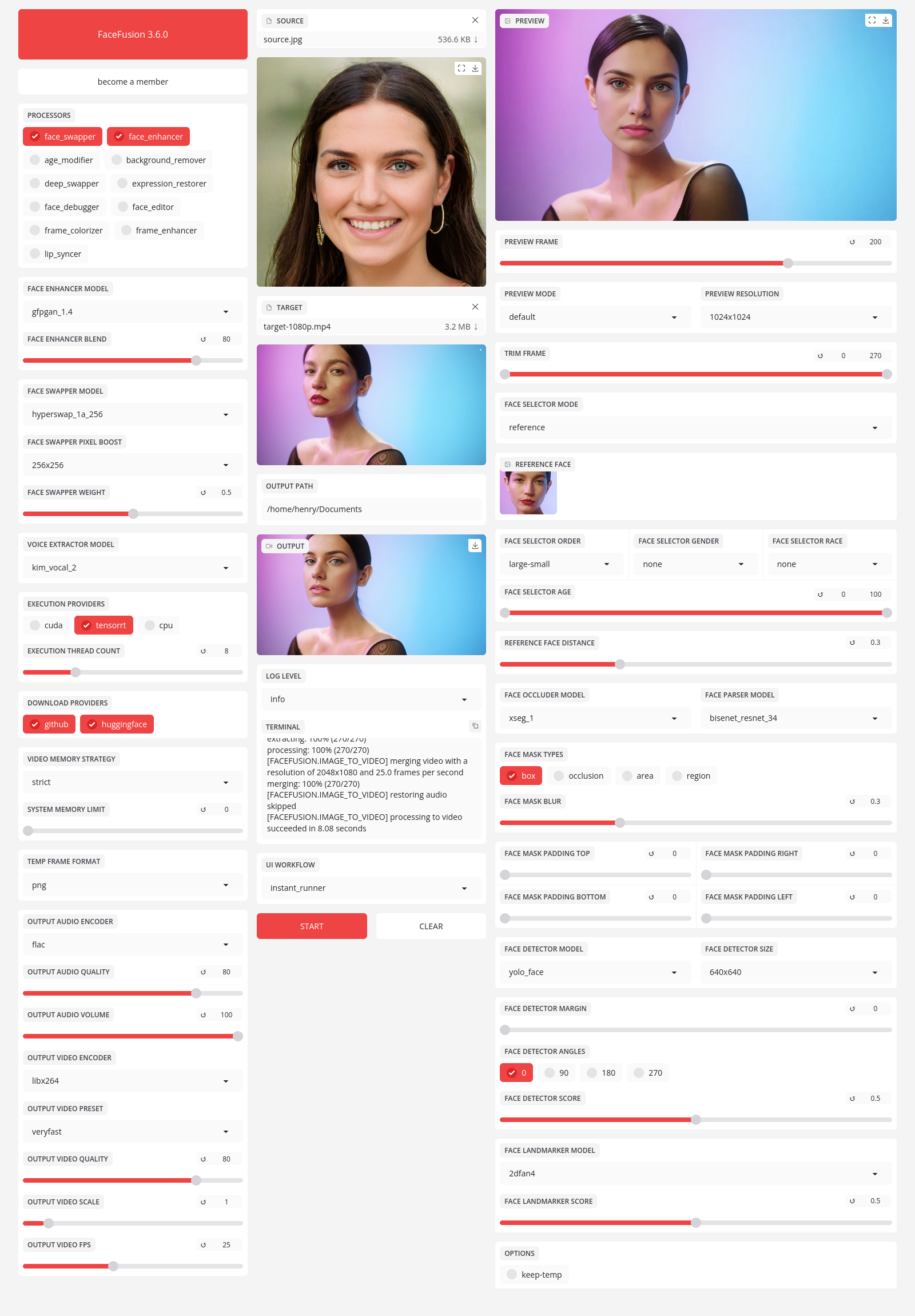
Be aware, the installation needs technical skills and is not for beginners. Please do not open platform and installation related issues on GitHub. We have a very helpful Discord community that will guide you to complete the installation.
Get started with the installation guide.
Run the command:
python run.py [options]
options:
-h, --help show this help message and exit
-s SOURCE_PATHS, --source SOURCE_PATHS choose single or multiple source images or audios
-t TARGET_PATH, --target TARGET_PATH choose single target image or video
-o OUTPUT_PATH, --output OUTPUT_PATH specify the output file or directory
-v, --version show program's version number and exit
misc:
--force-download force automate downloads and exit
--skip-download omit automate downloads and remote lookups
--headless run the program without a user interface
--log-level {error,warn,info,debug} adjust the message severity displayed in the terminal
execution:
--execution-providers EXECUTION_PROVIDERS [EXECUTION_PROVIDERS ...] accelerate the model inference using different providers (choices: cpu, ...)
--execution-thread-count [1-128] specify the amount of parallel threads while processing
--execution-queue-count [1-32] specify the amount of frames each thread is processing
memory:
--video-memory-strategy {strict,moderate,tolerant} balance fast frame processing and low VRAM usage
--system-memory-limit [0-128] limit the available RAM that can be used while processing
face analyser:
--face-analyser-order {left-right,right-left,top-bottom,bottom-top,small-large,large-small,best-worst,worst-best} specify the order in which the face analyser detects faces
--face-analyser-age {child,teen,adult,senior} filter the detected faces based on their age
--face-analyser-gender {female,male} filter the detected faces based on their gender
--face-detector-model {many,retinaface,scrfd,yoloface,yunet} choose the model responsible for detecting the face
--face-detector-size FACE_DETECTOR_SIZE specify the size of the frame provided to the face detector
--face-detector-score [0.0-1.0] filter the detected faces base on the confidence score
--face-landmarker-score [0.0-1.0] filter the detected landmarks base on the confidence score
face selector:
--face-selector-mode {many,one,reference} use reference based tracking or simple matching
--reference-face-position REFERENCE_FACE_POSITION specify the position used to create the reference face
--reference-face-distance [0.0-1.5] specify the desired similarity between the reference face and target face
--reference-frame-number REFERENCE_FRAME_NUMBER specify the frame used to create the reference face
face mask:
--face-mask-types FACE_MASK_TYPES [FACE_MASK_TYPES ...] mix and match different face mask types (choices: box, occlusion, region)
--face-mask-blur [0.0-1.0] specify the degree of blur applied the box mask
--face-mask-padding FACE_MASK_PADDING [FACE_MASK_PADDING ...] apply top, right, bottom and left padding to the box mask
--face-mask-regions FACE_MASK_REGIONS [FACE_MASK_REGIONS ...] choose the facial features used for the region mask (choices: skin, left-eyebrow, right-eyebrow, left-eye, right-eye, glasses, nose, mouth, upper-lip, lower-lip)
frame extraction:
--trim-frame-start TRIM_FRAME_START specify the the start frame of the target video
--trim-frame-end TRIM_FRAME_END specify the the end frame of the target video
--temp-frame-format {bmp,jpg,png} specify the temporary resources format
--keep-temp keep the temporary resources after processing
output creation:
--output-image-quality [0-100] specify the image quality which translates to the compression factor
--output-image-resolution OUTPUT_IMAGE_RESOLUTION specify the image output resolution based on the target image
--output-video-encoder {libx264,libx265,libvpx-vp9,h264_nvenc,hevc_nvenc,h264_amf,hevc_amf} specify the encoder use for the video compression
--output-video-preset {ultrafast,superfast,veryfast,faster,fast,medium,slow,slower,veryslow} balance fast video processing and video file size
--output-video-quality [0-100] specify the video quality which translates to the compression factor
--output-video-resolution OUTPUT_VIDEO_RESOLUTION specify the video output resolution based on the target video
--output-video-fps OUTPUT_VIDEO_FPS specify the video output fps based on the target video
--skip-audio omit the audio from the target video
frame processors:
--frame-processors FRAME_PROCESSORS [FRAME_PROCESSORS ...] load a single or multiple frame processors. (choices: face_debugger, face_enhancer, face_swapper, frame_colorizer, frame_enhancer, lip_syncer, ...)
--face-debugger-items FACE_DEBUGGER_ITEMS [FACE_DEBUGGER_ITEMS ...] load a single or multiple frame processors (choices: bounding-box, face-landmark-5, face-landmark-5/68, face-landmark-68, face-landmark-68/5, face-mask, face-detector-score, face-landmarker-score, age, gender)
--face-enhancer-model {codeformer,gfpgan_1.2,gfpgan_1.3,gfpgan_1.4,gpen_bfr_256,gpen_bfr_512,gpen_bfr_1024,gpen_bfr_2048,restoreformer_plus_plus} choose the model responsible for enhancing the face
--face-enhancer-blend [0-100] blend the enhanced into the previous face
--face-swapper-model {blendswap_256,inswapper_128,inswapper_128_fp16,simswap_256,simswap_512_unofficial,uniface_256} choose the model responsible for swapping the face
--frame-colorizer-model {ddcolor,ddcolor_artistic,deoldify,deoldify_artistic,deoldify_stable} choose the model responsible for colorizing the frame
--frame-colorizer-blend [0-100] blend the colorized into the previous frame
--frame-enhancer-model {lsdir_x4,nomos8k_sc_x4,real_esrgan_x2,real_esrgan_x2_fp16,real_esrgan_x4,real_esrgan_x4_fp16,real_hatgan_x4,span_kendata_x4} choose the model responsible for enhancing the frame
--frame-enhancer-blend [0-100] blend the enhanced into the previous frame
--lip-syncer-model wav2lip_gan choose the model responsible for syncing the lips
uis:
--ui-layouts UI_LAYOUTS [UI_LAYOUTS ...] launch a single or multiple UI layouts (choices: benchmark, default, webcam, ...)
Read the documentation for a deep dive.